Take collected logs to the wooden Sell Logs pad beside the orange chipper, walk onto the selling area and click CLICK SELL when the prompt is shown. Use your load counter to confirm that you brought wood. A fallen tree still needs to be collected before you can sell its logs.
This page focuses on finding the selling point, distinguishing collection from selling, and checking a selling attempt. For party setup, hand upgrades and the first Axe, use the beginner guide.
Gameplay reviewed: 15 October 2026. The instructions use recorded PC footage. The wiki has not playtested the game, and the troubleshooting checks below are not claims about a confirmed server bug.
Where is the selling point?
Look for three landmarks together:
- A Sell Logs sign.
- A wooden pad edged with black-and-yellow stripes.
- The orange chipper beside the pad.
Backpack displays stand on stumps nearby in the recorded starting area. Use these landmarks rather than the Tool Shop cabin or a lobby shop booth as your selling destination.
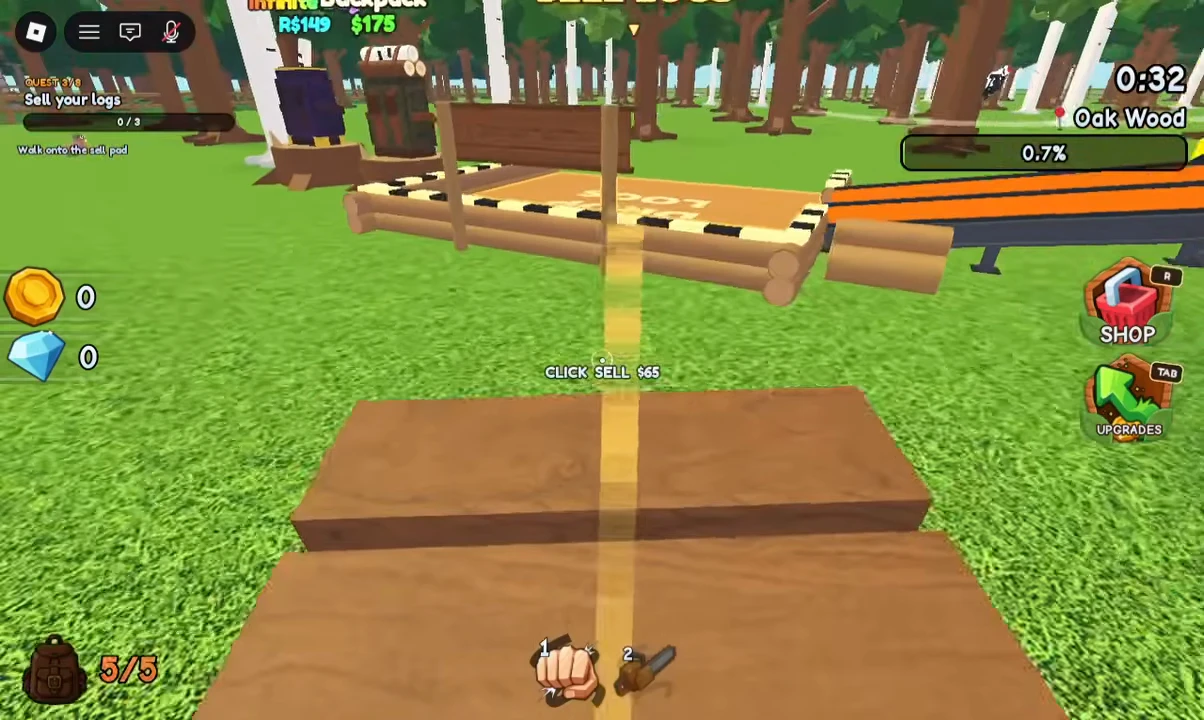
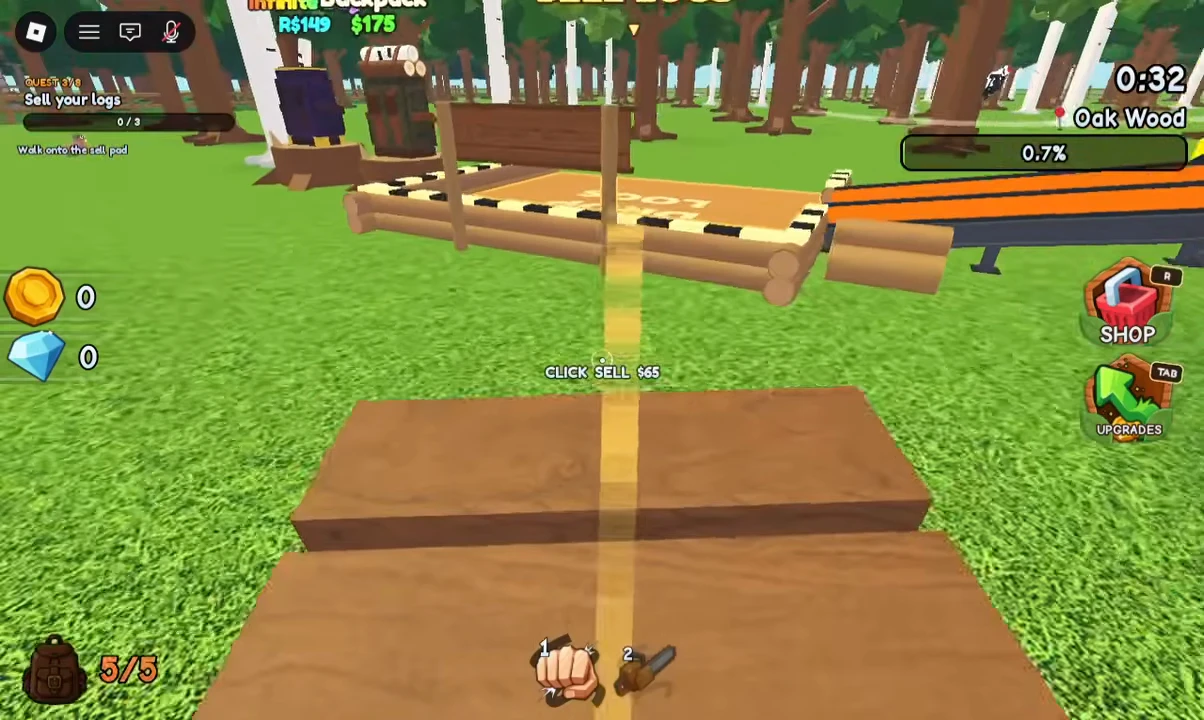
VendoPlus gameplay, 1:06. The frame shows the selling area and CLICK SELL $65 for a 5/5 load. The displayed amount is an example from that run, not a price-per-log formula. Image copy: Chop A Forest Wiki; reviewed 15 October 2026.
How to sell a carried load on PC
- Collect the wood. Check that your backpack counter is above zero.
- Return to the signed pad. Stand on the selling area beside the chipper.
- Read the prompt. The pictured PC run shows CLICK SELL with a value for the carried load.
- Click the selling prompt.
- Check the result. Look at the backpack counter, deposited wood and cash total together.
The screenshot shows a log bundle in the foreground and a wood icon in the hotbar. If you are unsure what you are carrying, inspect the bundle icon and your load counter before trying again. A keyboard shortcut for selling or log pickup has not been verified.
Mobile and controller selling controls are not verified. Follow the interaction shown on your device. The PC screenshot is not proof of a particular touch button or controller binding.
Why can't I sell my logs?
Work through the checks in order. Each one distinguishes a different part of collecting, depositing and processing wood.
| What you see | What to check | Next action |
|---|---|---|
| Your backpack counter is zero | You have no carried load shown in the HUD | Collect loose logs, then confirm the counter increases |
| Trees have fallen, but logs remain on the ground | Cutting has happened; collection still needs to happen | Pick up the fallen wood before returning to sell |
| You have wood but no CLICK SELL prompt | Your position relative to the signed pad and orange chipper | Walk onto the selling area and look for its current interaction label |
| You are at the Tool Shop or a lobby shop | Those are purchase locations | Return to the Sell Logs pad beside the chipper |
| You clicked but your load still shows the same amount | Whether the selling prompt was visible and activated | Recheck your position, carried load and displayed control |
| Your load was deposited, but wood is still processing | The visible chipper queue and your cash total | Observe processing before treating remaining wood as a failed deposit |
If these checks do not explain the problem, record a screenshot showing your load counter, selling prompt, wood at the pad and cash total. Include your device and whether the run is solo or with friends when reporting the problem. Those details make the point of failure clearer than “selling is broken.”
Deposited logs and chipper processing are different checks
Clout Brothers' first-load example shows depositing wood at the sell area at 2:52–3:05.
Later in NoobBlox's run, the creator unloads a vehicle and discusses wood continuing to sell while they return to cutting at 6:34–7:16. A large unload still being processed is different from carrying a load that never reached the pad.
Open Upgrades and inspect Chipper Speed under Gear when processing is the part you want to improve. This walkthrough does not establish an exact processing time, payout delay or a rule that every update credits cash at the same moment.
Reduce the collection and return work
Use the improvement that matches the task taking your time:
- More carrying room: inspect a backpack's current capacity before buying it. NoobBlox explains carrying upgrades at 2:51–3:21.
- Picking up loose wood: the Log Vacuum draws logs into your backpack. Its role is explained at 7:24–7:56.
- Repeated walks: identify the sell landmark before heading farther away, and inspect Walk Speed under Gear.
- Selling a larger haul: watch the load, deposited wood and processing state separately.
NoobBlox demonstrates cutting a group of trees, collecting the logs and loading a vehicle at 9:43–9:55. That is a progression example after obtaining the relevant gear, rather than a requirement for selling your first logs.
What is a log worth?
Read the amount displayed for your current load. The screenshot's $65 belongs to its recorded 5/5 bundle. It does not establish one universal price for every tree, upgrade, class or player.
Use the actual selling offer and your purchase target to make a spending decision. The Tools & Items guide explains the cutting, collection and carrying equipment separately.
Sources and limits
- VendoPlus — beginner gameplay at 1:06: pictured PC selling prompt, carried bundle and selling landmarks.
- Clout Brothers — first selling trip at 2:52: beginner deposit sequence and signed starting sell area.
- NoobBlox — unloading and processing at 6:34: queue discussion, carrying and Vacuum examples.
The VendoPlus image was visually reviewed from the credited image copy. The failure checks are a diagnostic routine based on the visible selling flow; they are not a tested fix for every server or device. Mobile/controller bindings, specific server faults and an exact current payout formula have not been verified.